S01. The Agent Loop — One Loop Is All You Need
S01. The Agent Loop — One Loop Is All You Need
The Problem
You ask the model: "List the files in my directory and run XXX.py."
The model can output a bash command, but once it's done outputting, it stops — it won't execute the command on its own, and it won't keep reasoning based on the result.
You could run it manually, paste the output back into the chat, and let it continue. Next command comes out, you run it again, paste it back.
Every round-trip, you're the middle layer. Automating that is what this chapter is about.
The Solution
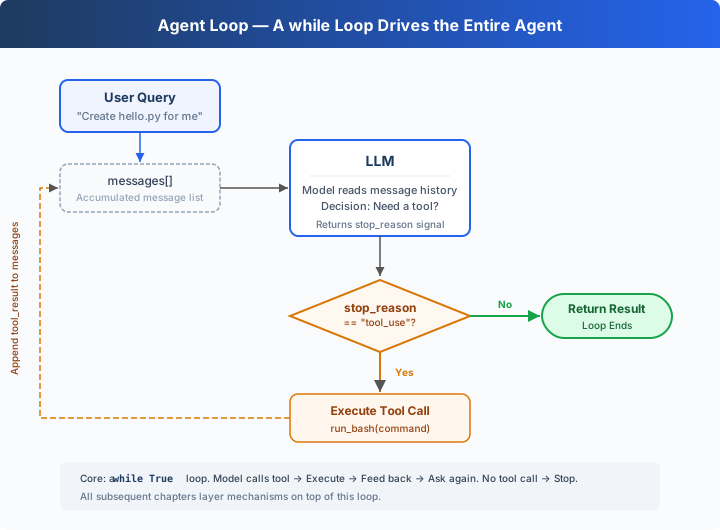
A while True loop: keep going when the model calls a tool, stop when it doesn't. The entire process hinges on two signals:
| Signal | Meaning | Loop Action | |--------|---------|-------------| | stop_reason == "tool_use" | Model raises hand: "I need a tool" | Execute → feed result back → continue | | stop_reason != "tool_use" | Model says: "I'm done" | Exit loop |
How It Works
Let's translate this process into code. Step by step:
Step 1: Start with the user's question as the first message.
messages = [{"role": "user", "content": query}]Step 2: Send the messages and tool definitions to the LLM.
response = client.messages.create(
    model=MODEL, system=SYSTEM, messages=messages,
    tools=TOOLS, max_tokens=8000,
)
Step 3: Append the model's response and check whether it called a tool. No tool call → done.
messages.append({"role": "assistant", "content": response.content})
if response.stop_reason != "tool_use":
    return
Step 4: Execute the tool the model requested and collect the results.
results = []
for block in response.content:
    if block.type == "tool_use":
        output = run_bash(block.input["command"])
        results.append({
            "type": "tool_result",
            "tool_use_id": block.id,
            "content": output,
        })
Step 5: Append the tool results as a new message and go back to Step 2.
messages.append({"role": "user", "content": results})Assembled into a complete function:
def agent_loop(messages):
    while True:
        response = client.messages.create(
            model=MODEL, system=SYSTEM, messages=messages,
            tools=TOOLS, max_tokens=8000,
        )
        messages.append({"role": "assistant", "content": response.content})

        if response.stop_reason != "tool_use":
            return

        results = []
        for block in response.content:
            if block.type == "tool_use":
                output = run_bash(block.input["command"])
                results.append({
                    "type": "tool_result",
                    "tool_use_id": block.id,
                    "content": output,
                })
        messages.append({"role": "user", "content": results})
Under 30 lines — that's the minimal runnable agent harness kernel. It's not intelligence itself, but the smallest runtime framework that lets the model keep acting. The model decides (whether to call a tool, which one), the harness executes (calls the tool and appends the result as a new message). The next 16 chapters all add mechanisms on top of this loop. The loop itself never changes.
Try It
Setup (first run):
pip install -r requirements.txt
cp .env.example .env
# Edit .env, fill in ANTHROPIC_API_KEY and MODEL_IDRun:
python s01_agent_loop/code.pyTry these prompts:
Create a file called hello.py that prints "Hello, World!"List all Python files in this directoryWhat is the current git branch?
What to watch for: When does the model call a tool (loop continues), and when does it not (loop ends)?
What's Next
Right now the model only has bash — reading files requires cat, writing files requires echo ... >, finding files requires find. Ugly and error-prone.
→ s02 Tool Use: What happens when we give it 5 proper tools? Will the model call multiple tools at once? Will parallel tool executions step on each other?
S01 — Complete teaching code
#!/usr/bin/env python3
"""
s01_agent_loop.py - The Agent Loop

The entire secret of an AI coding agent in one pattern:

    while stop_reason == "tool_use":
        response = LLM(messages, tools)
        execute tools
        append results

    +----------+      +-------+      +---------+
    |   User   | ---> |  LLM  | ---> |  Tool   |
    |  prompt  |      |       |      | execute |
    +----------+      +---+---+      +----+----+
                          ^               |
                          |   tool_result |
                          +---------------+
                          (loop continues)

This is the core loop: feed tool results back to the model
until the model decides to stop. Later chapters add policy,
hooks, and lifecycle controls around it.

Usage:
    pip install anthropic python-dotenv
    ANTHROPIC_API_KEY=... python s01_agent_loop/code.py
"""

import os
import subprocess

try:
    import readline
    # #143 UTF-8 backspace fix for macOS libedit
    readline.parse_and_bind('set bind-tty-special-chars off')
    readline.parse_and_bind('set input-meta on')
    readline.parse_and_bind('set output-meta on')
    readline.parse_and_bind('set convert-meta off')
except ImportError:
    pass

from anthropic import Anthropic
from dotenv import load_dotenv

load_dotenv(override=True)

if os.getenv("ANTHROPIC_BASE_URL"):
    os.environ.pop("ANTHROPIC_AUTH_TOKEN", None)

client = Anthropic(base_url=os.getenv("ANTHROPIC_BASE_URL"))
MODEL = os.environ["MODEL_ID"]

SYSTEM = f"You are a coding agent at {os.getcwd()}. Use bash to solve tasks. Act, don't explain."

# -- Tool definition: just bash --
TOOLS = [{
    "name": "bash",
    "description": "Run a shell command.",
    "input_schema": {
        "type": "object",
        "properties": {"command": {"type": "string"}},
        "required": ["command"],
    },
}]


# -- Tool execution --
def run_bash(command: str) -> str:
    dangerous = ["rm -rf /", "sudo", "shutdown", "reboot", "> /dev/"]
    if any(d in command for d in dangerous):
        return "Error: Dangerous command blocked"
    try:
        r = subprocess.run(command, shell=True, cwd=os.getcwd(),
                           capture_output=True, text=True, timeout=120)
        out = (r.stdout + r.stderr).strip()
        return out[:50000] if out else "(no output)"
    except subprocess.TimeoutExpired:
        return "Error: Timeout (120s)"
    except (FileNotFoundError, OSError) as e:
        return f"Error: {e}"


# -- The core pattern: a while loop that calls tools until the model stops --
def agent_loop(messages: list):
    while True:
        response = client.messages.create(
            model=MODEL, system=SYSTEM, messages=messages,
            tools=TOOLS, max_tokens=8000,
        )

        # Append assistant turn
        messages.append({"role": "assistant", "content": response.content})

        # If the model didn't call a tool, we're done
        if response.stop_reason != "tool_use":
            return

        # Execute each tool call, collect results
        results = []
        for block in response.content:
            if block.type == "tool_use":
                print(f"\033[33m$ {block.input['command']}\033[0m")
                output = run_bash(block.input["command"])
                print(output[:200])
                results.append({
                    "type": "tool_result",
                    "tool_use_id": block.id,
                    "content": output,
                })

        # Feed tool results back, loop continues
        messages.append({"role": "user", "content": results})


# -- Entry point --
if __name__ == "__main__":
    print("s01: Agent Loop")
    print("Enter a question, press Enter to send. Type q to quit.\n")

    history = []
    while True:
        try:
            query = input("\033[36ms01 >> \033[0m")
        except (EOFError, KeyboardInterrupt):
            break
        if query.strip().lower() in ("q", "exit", ""):
            break
        history.append({"role": "user", "content": query})
        agent_loop(history)
        # Print the model's final text response
        response_content = history[-1]["content"]
        if isinstance(response_content, list):
            for block in response_content:
                if getattr(block, "type", None) == "text":
                    print(block.text)
        print()
Try it — The Agent Loop scenario
A minimal agent that uses only bash to accomplish tasks